Guide
From adding the connector to your first answer
About 5 minutes. You need an assistant that supports MCP, such as Claude, ChatGPT or Cursor, a Google account and view access to your ad accounts. Then ask about spend, ROAS, bidding targets, search terms and campaign settings right in your assistant. Connect Google Search Console and Google Analytics 4 too and you can ask about organic search and what happens on the site after the click.
Before you start
- An assistant that supports remote MCP servers with OAuth sign-in: Claude, ChatGPT, Gemini, Cursor, VS Code, Claude Code, Gemini CLI or similar.
- A Google account to sign in to hecigo. No new password to create.
- View access to the ad accounts you want to read. View access is enough to read numbers. Only if you want to try a budget change do you need edit access on that account.
Add the connector
The connector address is the same for every assistant. Choose a quick link to copy the address and open the right settings page, or pick your assistant below for step-by-step instructions.
https://ads.hecigo.com/mcpEach one copies the address first. Cursor and VS Code fill it in; Claude and ChatGPT open their connector page for you to paste it. ChatGPT needs Developer mode on.
Claude
web, Desktop, mobile apps, Cowork- Open Customize and choose Connectors.
- Choose +, then Add custom connector.
- Name it Ads Insights, paste the connector address, then choose Add.
- Choose Connect on the new connector. hecigo's sign-in page opens.
- In a conversation, choose + at the lower left, then Connectors, and turn Ads Insights on.
The Free plan allows one custom connector. On Team and Enterprise, an owner adds the connector in Organization settings first, and members only choose Connect. Add it once and it works on the web, Desktop, Cowork and mobile.
Illustration. The real screen may differ slightly between versions.
ChatGPT
on the web- Open Settings, go to Security and login, and turn on Developer mode.
- Open Plugins at chatgpt.com/plugins and choose + to create an app.
- Name it Ads Insights, paste the connector address as the MCP server URL, and choose OAuth for authentication.
- Create the app. ChatGPT opens hecigo's sign-in page.
- In a new conversation, choose +, then Developer mode, and select Ads Insights.
Developer mode is available on Plus, Pro, Business, Enterprise and Education, on the web. Menu names in ChatGPT change between versions; if you cannot find one, see OpenAI's help pages on Developer mode.
Illustration. The real screen may differ slightly between versions.
Gemini
on the web, then in the mobile app- Open gemini.google.com on a computer. Choose Settings at the bottom, then Connected Apps. If you cannot see it, open Personal Intelligence first.
- Under Custom apps, choose Add a custom app and paste the connector address. Leave Advanced features closed: Ads Insights registers with Gemini by itself.
- Choose Next. hecigo's sign-in page opens.
- In a conversation, type @ and pick Ads Insights so Gemini uses it for that question.
According to Google's help page (checked by hecigo on 12 October 2026), custom apps are open only to personal Google accounts, to people 18 or over in the US, in English, with Keep Activity on. Work and school accounts cannot use them yet. Because of this, hecigo has not run Gemini end to end; outside the US, Claude or ChatGPT is the surer path.
Cursor
code editor- Choose Add to Cursor in the quick links above. Or open ~/.cursor/mcp.json for every project, or .cursor/mcp.json in one project, and add the configuration shown.
- Open Customize in the sidebar, find Ads Insights and switch it on.
- When Cursor asks you to sign in to Ads Insights, choose it to open hecigo's page in your browser.
{
  "mcpServers": {
    "ads-insights": {
      "url": "https://ads.hecigo.com/mcp"
    }
  }
}
VS Code
with an MCP-capable assistant- Choose Add to VS Code in the quick links. Or run MCP: Add Server from the Command Palette, choose HTTP, paste the connector address and pick Global or Workspace. You can also add the configuration shown to .vscode/mcp.json.
- VS Code asks whether you trust the server before it starts: confirm to start Ads Insights. The first time, VS Code opens your browser to sign in to hecigo.
- In the Chat view, choose Configure Tools and turn on the Ads Insights tools.
{
  "servers": {
    "ads-insights": {
      "type": "http",
      "url": "https://ads.hecigo.com/mcp"
    }
  }
}
Claude Code
command line- Run the command shown in your terminal.
- In Claude Code, type /mcp and follow the browser to sign in. Or run claude mcp login ads-insights.
claude mcp add --transport http ads-insights https://ads.hecigo.com/mcp
Gemini CLI
command line- Run the command shown in your terminal. --scope user makes it available in every folder; without it, only in the current one. Or add httpUrl pointing at the connector address to ~/.gemini/settings.json.
- Open Gemini CLI and type /mcp auth ads-insights. Your browser opens hecigo's sign-in page; come back to the terminal when it is done.
- Type /mcp to see Ads Insights connected. The first time a tool runs, Gemini CLI asks you to confirm; choose to always allow this server so it stops asking.
Signing in needs a machine with a browser; over SSH without one, step 2 cannot finish. Since 18 June 2026, free accounts and Google AI Pro and Ultra plans have moved to Antigravity CLI; Gemini CLI still runs with a paid Gemini API key or a Gemini Code Assist Standard or Enterprise licence. Google's documentation does not yet say how Antigravity CLI signs in to a remote MCP server with OAuth, so hecigo has no guide for it yet.
gemini mcp add --transport http --scope user ads-insights https://ads.hecigo.com/mcp
Other assistants
with MCP support- Find where to add a remote MCP server (HTTP or Streamable HTTP).
- Paste the connector address. The assistant must support OAuth sign-in to open hecigo's sign-in page.
Sign in and allow
hecigo's page opens. Choose Sign in with Google and pick any account. The first time, hecigo creates a workspace that can read only by default, with no budget tools, and sends a welcome email. If you signed in to the portal in this browser within 30 days, the page already knows you.
If your workspace has an ad platform connected, hecigo allows the assistant and takes you straight back. If not, the page shows one button, Connect ad accounts: the assistant is connected, this tab returns to it, and the platform page opens in a new tab.
Choose Use a different Google account below the button, then sign in with that workspace's account. An invite code or workspace key is only for people hecigo sent one to, and sits in the folded section.
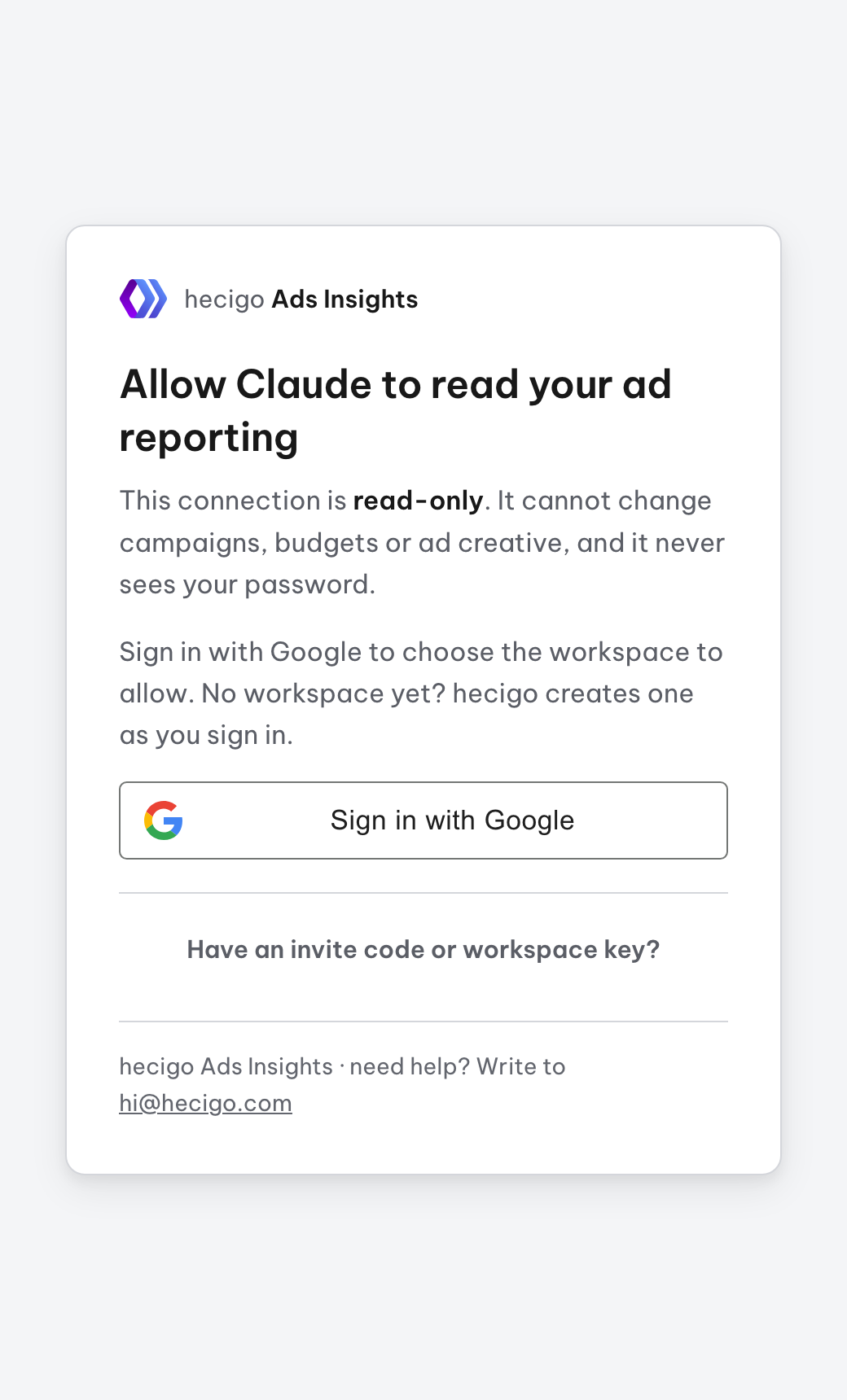
When hecigo temporarily switches to manual approval, step 2 becomes an access request: you get an email once approved, then go back to your assistant and connect again.
Connect ad accounts
Your assistant can only read platforms connected to your workspace, even after the connector is added. The platform page opens from the Connect ad accounts button above, from Step 1 in the portal at ads.hecigo.com/portal, or from the link your assistant gives you when nothing is connected. That link works for 15 minutes.
Choose Google Ads, pick the Google account that can view your ad account, then grant access on Google's own screen. When done, the result page offers buttons to open Claude or ChatGPT, or to go back to the portal.
Choose Meta Ads, sign in with the Facebook account that can access your ad account, then grant access on Meta's own screen. Pick the ad account you want read on that screen. For now Meta's consent screen asks only to read ad numbers (ads_read). Page read permissions (pages_show_list, pages_read_engagement, read_insights), used to answer questions about followers, organic reach and post engagement, will be added once Meta approves them; people who already connected Meta will then reconnect once, and without them ad numbers keep working as before.
Choose TikTok Ads, sign in with the TikTok for Business account that can access your ad account, then choose Confirm on TikTok's screen.
Optional, only if you want to ask about organic search. Choose Google Search Console, pick the Google account that is a user of your verified site in Search Console, then grant read access on Google's own screen.
Optional, only if you want to ask what happens on the site after the click. Choose Google Analytics, pick the Google account that has Viewer on the GA4 property, then grant read access on Google's own screen.
The portal shows which platforms are being read and which assistants are connected, with a button to disconnect each. Disconnecting Google Ads in the portal removes hecigo's access; review and revoke every grant at myaccount.google.com/permissions.
Check the connection
Ask your assistant the question below. It calls the ads_health tool, says which platforms are connected and still working, and hands you a connection link if nothing is connected.
Check whether my connected ad platforms are still working.
Questions by task
Ask the way you would ask an ads specialist: name the dates, the platform and the decision you need to make. The assistant combines the tools itself, with numbers straight from the platforms. These questions only fetch numbers; nothing in your accounts changes. A budget change is separate, available only in a workspace given the write scope (see the budget-adjust skill).
Summarise the last 7 days, excluding today, against the 7 days before: total spend, conversion value, ROAS and cost per conversion by platform. Name the 3 campaigns that lifted results and the 3 that dragged them down, with the numbers behind each.
For each running Google campaign, put its configured target ROAS or target CPA next to its actual ROAS and cost per conversion over the last 30 days. Which campaigns miss their target by more than 20%? Do not read targets from campaign names.
List the conversion actions counted in the conversions column and used for bidding, with their lookback windows and attribution model. Is anything like a page view or a first app open inflating conversions?
Over the last 30 days, which search terms spent money without converting? Rank them by cost, group them by theme, propose a negative keyword list and flag terms that mention competitors.
For each Performance Max asset group: ad strength, 30-day ROAS, which assets Google rates LOW and should be replaced, and whether its audience signals and search themes fit what we sell.
Which campaigns look mistargeted: locations outside the markets we sell to, location matching by interest rather than presence, missing exclusions, or a Search campaign with the Display Network switched on?
Compare running ads over the last 14 days by cost per conversion and ROAS. For the best 3 and the worst 3, read their headlines, copy and destination links, and explain what sets them apart.
Based on 30-day ROAS, current daily budgets and impression share lost to budget, which campaigns should get more, the same or less budget? Suggest a figure for each and explain why.
On Meta, which age group, gender and province or region are spend and cost per conversion concentrated in this week against last week? Ask one split at a time. Say which platforms cannot split that way.
Spend yesterday was far below normal. Check account status, spend caps, rejected ads, ineligible campaigns and daily budgets, then give the main cause first.
Which Google searches brought clicks to my site this month without an ad, and which of them do I also pay for in Google Ads? Flag terms that already rank in the top 3 organically but still cost a lot in ads.
Compare the last 28 days with the 28 days before in Search Console: which pages lost the most organic clicks? For each, say whether position fell, impressions fell or CTR dropped.
Over the last 30 days, which landing pages did paid sessions (medium cpc) reach, with what engagement rate and key events? Put them next to each platform's spend and clicks so I can see which clicks became real visits.
Give me last week's spend, impressions, clicks and conversions, Monday to Sunday, by campaign and in the ad account's time zone, so I can compare with Ads Manager.
Add the skills to Claude
The connector lets your assistant read the numbers. hecigo's skills add the method: six written workflows Claude uses on its own when a question matches. They run on Claude only (chat, Cowork, Claude Code). ChatGPT, Gemini and Cursor do not use Claude skills, but the core of them, such as how to read Meta costs and compare two periods, already ships with the connector.
meta-vn-diagnosis: Why Meta costs rose, and whether to scale, hold, fix or stop. Handles shops that sell in the Messenger inbox.weekly-ads-report: A weekly report for the owner, against the week before.roas-target-audit: Actual ROAS and CPA against the targets you set.search-term-cleanup: Search terms that cost money without converting, with a suggested negative keyword list.performance-max-audit: A Performance Max check: weak assets, audience signals, ROAS by asset group.budget-adjust: Safe budget changes: always plan first, show you the difference, apply only after you confirm. The confirmation is a protocol the skill follows; the server cannot check it. Only in a workspace given the write scope.
Claude on the web, Desktop, mobile and Cowork
- Open Customize and choose Plugins.
- Choose Add → Add marketplace → Add from a repository, enter hecigo/ads-insights-plugin and choose Sync. Leave Sync automatically on.
- On the hecigo Ads Insights plugin that appears, choose Add.
- Open the plugin's Connectors tab. If you added the Ads Insights connector before, it already shows Connected; if not, connect it and hecigo's sign-in page opens, as in step 3.
- Check Settings → Capabilities: Cloud code execution and file creation must be on, since skills need it to run.
Ask as usual: Claude picks the skill when a question matches. To choose one yourself, type / in the message box and pick it, for example meta-vn-diagnosis (in Claude Code: /hecigo-ads-insights:meta-vn-diagnosis). One install covers the web, Desktop, mobile and Cowork.
Claude Code
Run the two commands below in Claude Code. If you installed the plugin on claude.ai, Claude Code picks it up in its next session.
/plugin marketplace add hecigo/ads-insights-plugin
/plugin install hecigo-ads-insights@hecigo
When the skills are updated: with Sync automatically, Claude picks them up; if Claude says automatic sync needs GitHub access, go to Customize → Plugins → Add → Manage marketplaces and choose ⋮ next to ads-insights-plugin → Check for updates. On Team and Enterprise plans, if Add marketplace is missing, an Owner has to let members add their own.
Reconciling numbers
- Pick the same dates and leave today out. Presets such as Last 7 days in Ads Manager exclude today, and today's numbers are still moving.
- Days follow the ad account's time zone, not your computer's.
- Meta's Clicks column includes image taps and taps on see more. To compare site visits, ask for link clicks.
- Each platform counts conversions over its own attribution window, so do not add one platform's conversions to another's and compare the sum to a single figure.
- ROAS and conversion value are the platform's own numbers. Google counts its primary conversion actions; Meta values only the action being counted. To see which actions count, ask for a conversion audit.
Common problems
Usually the Facebook account you are signed in with has no access to that ad account. Sign in with one that does and choose Connect again. Still failing? Message hecigo on Zalo or write to hi@hecigo.com.
Since 21 April 2026 Google requires 2-Step Verification from anyone granting Google Ads access, and some accounts must also sign in with a passkey. Turn it on at myaccount.google.com/security, then choose Connect again. Connections made before are not affected.
Remove the connector and add it again. On hecigo's page, check that the workspace name shown is right; if not, choose Use a different Google account.
The assistant is reading a workspace with no platform connected. Open the portal to check the workspace name and Connected assistants, then choose Connect; or use the link your assistant gave you within 15 minutes.
Links from the assistant work for 15 minutes. Ask your assistant again for a new one, or open the portal and choose Connect.
The assistant can only read sites where the Google account you authorised is a user in Search Console. Add that account under the site's Settings, Users and permissions, then connect Google Search Console again in the portal.
The assistant can only read GA4 properties where the Google account you authorised has Viewer or higher. Add it under the property's Admin, Property access management, then connect Google Analytics again in the portal.
Assistants keep the tool list from when a conversation started. Start a new conversation; if it is still missing, turn the connector off and on in the assistant's settings.
Ask it to check connections to see the exact error, then reconnect that platform in the portal.
See the reconciling section above. It is usually different dates, today included, or Clicks compared with link clicks.
Turn the connector on in the conversation, or say “use Ads Insights” in your question.
Check that your assistant's plan supports remote MCP servers, then see that assistant's official help pages.
Need a person?
Stuck at any step? Message hecigo with a screenshot of that step.